
Debug an iPhone plugged into another Mac or PC
Nuticast shares an iPhone’s USB cable with the Mac that runs Xcode. The phone needs no Wi‑Fi or VPN, and its Mac needs no license.
Updated
Requires macOS 13.5+, Xcode 15+ and iOS 17+.
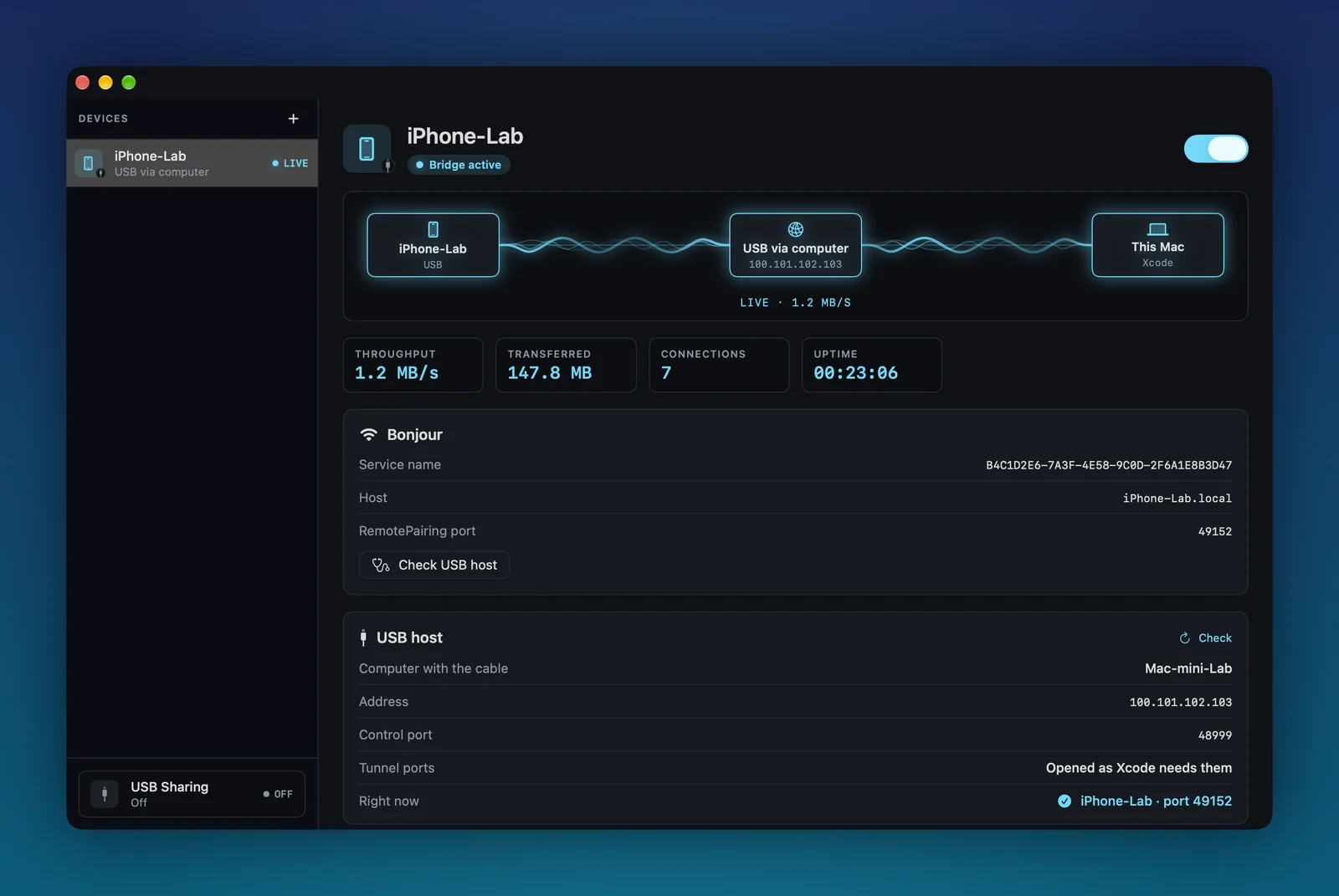
What each route asks of the phone and the Macs.
USB via computer is the route for a phone on a cable. Remote Wi‑Fi is the other route in the same app, for a phone on a different Wi‑Fi.
| Compared on | USB via computer | Remote Wi‑Fi |
|---|---|---|
| Where the phone is | Plugged into another computer: a Mac mini on a shelf, a teammate’s Mac or a Windows PC. | On a different Wi‑Fi from your Mac. |
| What the phone needs | A data cable. No Wi‑Fi and no VPN. | Wi‑Fi (cellular does not work) and the same mesh VPN as your Mac: Tailscale, ZeroTier or Netbird, or a manual IP. |
| What links it to your Mac | The two Macs reach each other, over a mesh VPN or the local network. | Your mesh VPN, between your Mac and the iPhone. |
| Which Mac needs a license | Only the Mac with Xcode ($49 per year, or $80 per seat per year on Team). The Mac with the cable runs USB Sharing for free. | The Mac with Xcode ($49 per year). |
| What Xcode sees | A normal run destination. It builds, installs and debugs over the other Mac’s cable. | A normal wireless run destination. Nuticast replays the phone’s Bonjour record and relays Xcode’s traffic over your mesh. |
The cable stays put. Xcode still sees the phone.
Nuticast doesn’t forward raw USB. It forwards the network services Xcode itself uses to reach an iPhone (RemotePairing and the CoreDevice tunnel), which the phone already offers over its cable.
- iPhoneiPhone-LabOn a cable. Needs no Wi‑Fi and no VPN.
- The Mac with the cableUSB Sharing onNuticast shares the cabled iPhone. This Mac needs no license.
- Your MacNuticastAdds the phone with the “USB via computer” connector.
- XcodeRun destinationiPhone-Lab is listed and ready.
Where the cable can live.
- A test phone on an always-on Mac mini
- Keep the device cabled to a Mac in a rack or a cupboard, charged and in one place, and debug on it from your own Mac.
- A phone on a teammate’s desk
- Their Mac shares the cable, your Xcode runs the build. Nobody has to unplug anything or pass a phone around.
- Your Mac at home, you at the office
- Leave the phone charging next to the home Mac and debug it over your mesh VPN from wherever you work.
Setup and troubleshooting
Four parts, two on each Mac, with every screen and the error messages you may meet. A Windows PC can be the computer with the cable.
Only the Mac with Xcode needs a license.
Pairing and USB Sharing are free. Bridging from the Xcode Mac is $49 per year. 14-day refund if it does not work for your setup. The Mac with the cable needs no license.
On Team, $80 per seat per year, each developer who builds needs a seat. A shared Mac with a cabled iPhone needs no seat.
Compare the optionsWhat it can’t do.
- The computer with Xcode is a Mac running Nuticast. The computer with the cable is a Mac running Nuticast too, or a Windows PC running Nuticast USB Host (see the setup guide). Linux isn’t supported. They have to reach each other over the network.
- The iPhone has to be paired with the Xcode Mac once. A Mac that has never been next to the phone can’t use it yet.
- Share over a mesh VPN address. A local-network address exposes the iPhone’s debugging port to everyone on that network.
- A sharing Mac shares one iPhone at a time.
Questions
Can Xcode debug an iPhone that is plugged into another Mac or a Windows PC?
Not on its own: Xcode only sees devices on its own Mac’s cable or Wi‑Fi. With Nuticast, the Mac with the cable switches on USB Sharing (a Windows PC runs Nuticast USB Host instead) and your Mac adds the phone with the “USB via computer” connector. Xcode then builds, installs, runs and debugs on the iPhone over that computer’s cable, with breakpoints, LLDB and the console as usual.
Does the iPhone need Wi‑Fi or a VPN?
No. On this route the iPhone only needs the cable. The two Macs need to reach each other: over a mesh VPN such as Tailscale, ZeroTier or Netbird, or over the local network.
Can the computer with the cable be a Windows PC?
Yes. Nuticast USB Host for Windows does the same job as the Mac’s USB Sharing: it finds the iPhone on the cable and forwards it to your Xcode Mac, through Apple’s CoreDeviceProxy tunnel. It needs Apple Devices from the Microsoft Store on the PC. Linux is not supported. The computer with Xcode is always a Mac.
Does the iPhone have to be paired with my Mac first?
Yes, once, like any Nuticast device: pair it with your Xcode Mac while it is next to that Mac (over Wi‑Fi on iOS 27 or later, or over a cable). After that it can live on the other Mac’s cable.
Do both Macs need a license?
No. Only the Mac that runs Xcode and starts the bridge needs a license ($49 per year, or $80 per seat per year on Team). The Mac with the cable runs USB Sharing for free.
Is it safe?
The Mac with the cable listens only on the address you pick. What it exposes is the iPhone’s RemotePairing port, which still demands the pairing identity your Xcode Mac holds. Share over a mesh VPN address so only members of your VPN can connect. A local-network address lets anyone on that network reach the iPhone’s debugging port, and Nuticast warns you when you pick one.
How is this different from VirtualHere or USB Network Gate?
Those tools forward raw USB, and developers report the iPhone missing from Xcode or dropping right after it connects. Nuticast doesn’t forward USB. It forwards the network services Xcode itself uses to reach an iPhone (RemotePairing and the CoreDevice tunnel), which the phone already offers over its cable.